mn
mn  ru
ru 
XP Overload CS2 Guide: XP Limit, Reduced XP, and Icon Tiers
Any active Counter-Strike 2 player in recent years may have noticed that after a few matches, the XP awarded for each subsequent match decreases. Those who are particularly observant may also have noticed a small but mysterious icon appearing next to their nickname. Without further ado, this is all part of one of the game’s mechanics, called XP Overload. In this guide for MelBet Pick’em, we’ll explore what XP Overload CS2 is, how it’s activated, why it was added, and how much it affects leveling. You’ll also find all the CS2 XP Overload icons here, and by the end of the article, you’ll have a better understanding of how to earn experience in CS2!
What is XP Overload in CS2?
XP Overload in Counter-Strike 2 is an internal progression control system. It is designed to limit experience gains after reaching the weekly XP cap. This mechanic was added relatively recently, on February 6, 2024.
In simple terms, the CS2 XP Overload system records the moment a player reaches 11,166 XP in a week. Upon reaching this number, the profile is switched to reduced XP gain mode, and an XP Overload icon appears next to the player’s nickname.
XP Overload is not dependent on game mode or player level. It is activated for absolutely everyone who reaches this XP cap.
CS2 XP Overload Mechanics Explained
We explained that if a certain number of XP is reached, the profile switches to reduced XP gain mode. However, in practice, things are a bit more complicated. There are many different nuances that even professional players often ask about. So, we’ve tried to describe all the mechanics of CS2 XP Overload in this list. It describes what happens when the XP cap is reached:
- Disabling all XP bonuses: All weekly multipliers, first-match bonuses, mode coefficients, and mission bonuses become inactive until the next weekly reset.
- Separate XP accrual algorithm: After reaching the weekly XP cap, all experience values are calculated using the formula XP_after_overload = XP_base × 0.175. This means the player receives only 17.5% of the standard amount of XP. “Standard” means gaining experience without all bonuses.
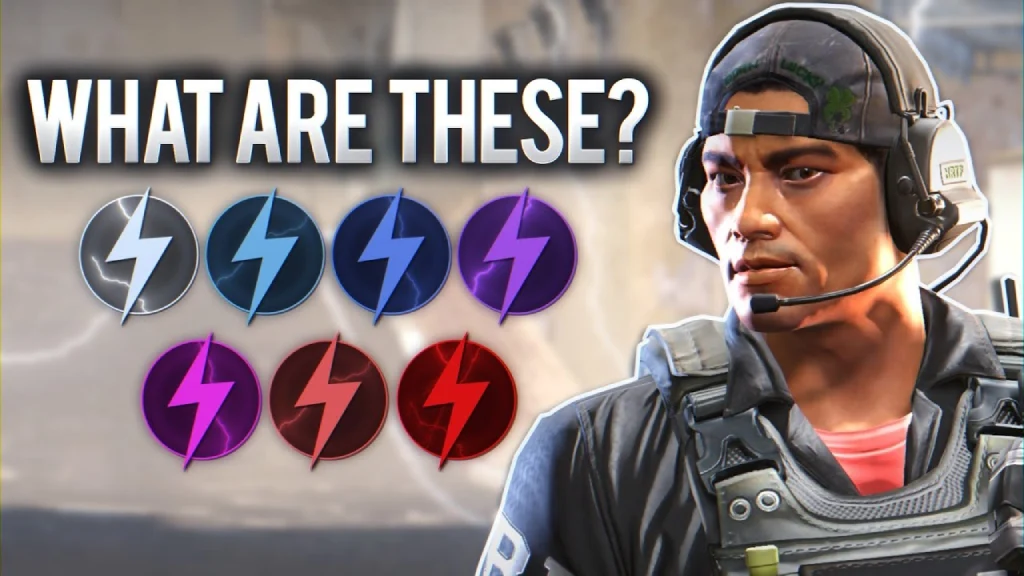
- Enable XP Overload Icon: The UI displays a special icon next to your nickname. This is a dedicated public indicator of XP Overload status.
XP Overload Icon in CS2 — What It Means
We’ve already noted the existence of the XP Overload icon in CS2. However, it’s worth exploring in more detail. In the Counter-Strike 2 progression system, it serves as a public marker of your profile status. Its purpose is to show other players that you’re in a limited XP mode.
It’s displayed in many places, and we’ve created a complete list of where you can find it:
- CS2 main menu (next to your profile nickname).
- Scoreboard during a match (TAB menu).
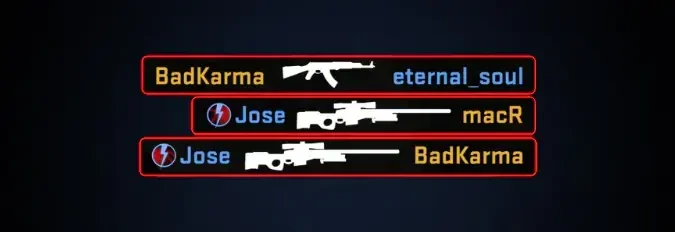
- Kill feed – if a player gets a kill or participates in an event.
- Player information in the lobby (when hovering over it).
Therefore, although XP Overload is an experience points limitation, Valve does everything possible to encourage players to earn it. After all, it’s a so-called activity achievement, not a penalty.
XP Overload Icon Tiers and Their Upgrades
The XP Overload icon has several tiers. Seven tiers, to be precise. The more weeks in a row you reach the XP cap, the higher your icon tier. It starts at the base level and improves with each week.
However, between each icon tier, there are intermediate icons. These icons are of the same tier but have a slightly different appearance. It works as follows:
- After the first week, you receive the base icon.
- After 4+ weeks, you receive the next tier icon (a new color).

Thus, each tier (except the last) has five different icons. It takes five weeks to complete one tier. During these weeks, you need to reach the maximum XP level – 11,666 or more.
As for the final tier – the red lightning icon – it has seven different icons. Once the last one is reached, week 7-8 will be written next to the icon, and so on.

Why Does XP Overload Exist in CS2?
Now that you know much more about the XP Overload CS2 system, it’s worth discussing its purpose. Among active players in the community, there’s a common joke that it’s a Valve badge that reminds you to go outside. That is, playing 24/7 means you can’t earn more experience and have to wait until next week.
Overall, it’s a good joke, even a very good one. Going outside is very important; you shouldn’t play constantly. However, the goals of this badge are somewhat more global:
- Preventing XP inflation and the destruction of player economy levels.
- Balance between players with different amounts of free time.
- Controlling CS2 Weekly Drop and other in-game rewards.
- Preventing XP farming and exploits.
- Preventing emotional and gameplay burnout.
Ultimately, this XP Overload mechanic keeps the entire progression ecosystem under control. Without it, there would be a severe stratification of players, as some would likely play 50-70 hours a week. This would give them a significant advantage over those who play for just a couple of hours to unwind after a hard day at work.
How to Earn XP Faster and Reach XP Overload Quickly
People love to stand out. The addition of CS2 XP Overload icons was met with mixed reactions, but there are plenty of people now who want to get the best icon at any cost. It’s generally not difficult. You just need dozens, if not hundreds, of hours of free time to play. And to make farming HP a little easier, we’ve prepared several modes that are best played:
- Premier: 30 XP per round, highest XP/hour: 360 XP for 13 won rounds. We recommend choosing your best maps, as the longer the match, the more XP.
- Competitive: Also 30 XP per round, but matches are usually shorter. Play two or three of your strongest maps and avoid large ranking imbalances.
- Wingman: 15 XP per round, matches are 10-15 minutes long, gives 120-200 XP per game. The fastest way to start the week is to play 3-4 matches, which gives you 400+ XP in CS2.
- Deathmatch: 0.2 XP per score: 2000-2500 scores give you 350-450 XP in 8-10 minutes. Best XP/time with good aim.
- Casual: Gives 250-350 XP per match with active play, but the XP is inconsistent. Only useful if you don’t have time for Competitive/Premier.
Should You Worry About XP Overload?
Now, if you’ve been reading carefully, you know what XP Overload is in CS2. It’s not a penalty at all, but rather the opposite, a balancing mechanism designed to care for the community. The XP cap is a working way to make leveling up fair. XP Overload icons, on the other hand, are clearly a cool incentive for those who play dozens of hours a week and want to stand out.
Generally, there’s no point in playing just to get an icon. But if you enjoy playing CS2, an icon will be a great way to stand out. We wish you good luck in your games and as much HP as possible!
FAQ
It’s a progression system designed to eliminate XP inflation. Under this system, once the weekly cap is reached, XP gains are reduced to a multiplier of 0.175x. Without this mechanic, nerds could earn 40-60k XP per week and ruin the tier economy.
The exact XP Overload threshold is 11,166 XP. It’s calculated by Valve based on the weekly XP multiplier formula: the first 4,500 XP receives a 3x bonus, the next 3,000 XP receives a 1x bonus. The remaining XP is calculated using the standard formula until the total weekly cap is reached.
No, XP Overload does not affect ranks. Premier, Competitive, and Wingman use independent MMR/round-based scoring models. This model only takes into account rounds won, round difference, economic factors, individual impact, and hidden matchmaking coefficients.
The reset occurs when the CS2 Weekly Drops update. This occurs every Tuesday/Wednesday at 00:00 UTC.
There are seven tiers: Common, Uncommon, Rare, Mythical, Legendary, Ancient, and Unusual. However, each of these tiers has intermediate icons. In total, including intermediate icons, it will take you 32 weeks to reach the rarest XP Overload icon.
With optimal farming, XP Overload is achieved in 6-10 hours of pure play. However, everything depends on your skill and the modes you play. We recommend rereading our tips on earning XP.
Read also: