mn
mn  ru
ru 
Steam Trade Protection Update 2025
On July 16, 2025, Counter-Strike 2 received an update that instantly shook the community — the introduction of the Trade Protected system. CS2 trade protection, automatic trade rollbacks, 30-day cooldowns, and a wave of market panic all hit at once. Now, nearly a month later, I’ve tested every detail, studied the mechanics inside and out, and I’m ready to break it all down — from how trade reversal works to the hidden risks behind this major change.
In this article, I’ll walk you through exactly how the new CS2 trade protection system works, why many traders are losing trust, and how it’s already impacting CS2 skin trading and item prices. We’ll look at what’s really happening on the Steam Market, how safe trading has changed forever, and what this means for the future of the CS2 economy. And before we dive in — don’t forget: you can win valuable CS2 and Dota 2 skins for free by joining the MLB Pick’em challenges. Don’t miss your chance to claim yours!
What is Trade Protected in Steam and Why Is It Needed
Trade Protected is a new security system in Steam. Its main goal is to protect players from losing valuable CS2 skins in case of account hijacking or phishing. Now, any trade involving such items can be reversed within 7 days.
How Trade Protection Works
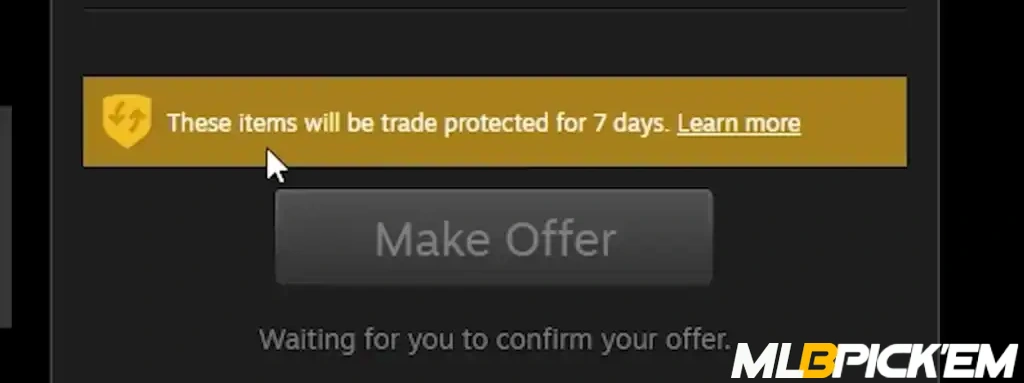
If you look deeper into how Trade Protected works, here’s the idea. Let’s say you receive a CS2 item through a trade — as soon as the trade is confirmed, the item is automatically locked for 7 days. During this period, it cannot be sold, transferred, modified, equipped, moved to a Storage Unit, or even have a sticker applied.
If during this time you realize your Steam account was compromised or the trade was made fraudulently, you can reverse all trades with protected items in one click — no need to contact Steam Support. But that rollback comes at a cost: a 30-day cooldown on all trades and access to the Steam Market, including the cancellation of all active listings and offers.
Which Games Support Trade Protection in 2025
Currently, Trade Protection only works with Counter-Strike 2. Specifically, all items received through trades in CS2 are automatically protected and marked with a yellow icon featuring two arrows in your inventory. However, during the July CS2 Trade Update, Valve officially announced that this system is planned to expand to other games on Steam in the future. But nearly a month has passed — and surprisingly, there’s been no movement yet: CS2 remains the only game where trades can be reversed using Trade Protection.
How to Reverse a Trade in Steam: Step-by-Step Guide
Before reversing a trade, make sure you have full control over your Steam account. It is recommended to check your security settings, change your password, and ensure there is no unauthorized access. If there are even minimal signs of hijacking or phishing, contact Steam Support immediately.
Next, go to your Steam trade history, where all trades involving Trade Protected items are displayed. The system will automatically highlight the trades that are eligible for reversal. With a single click, you can initiate a CS2 trade rollback, and all such trades made within the past 7 days will be canceled.
All skins will be returned to their previous owners, and your account will receive a 30-day cooldown on trading and access to the Steam Market. This is part of the Steam trade protection system, designed to protect players from repeated attacks and fraudulent operations involving valuable items.
Which Trades Can Be Reversed and Which Cannot
Trade rollback is only available for trades involving Trade Protected items — these are marked with a yellow shield directly in the trade window and in your inventory. If the trade was completed before the Steam Trade Protection system was introduced, it can no longer be reversed. Even if you’re certain the trade was fraudulent, neither you nor Steam Support will be able to manually reverse it. The system works strictly with trades that include protected CS2 items and only within the 7-day reversal window.
Can You Reverse Just One Trade?
No, unfortunately, it’s not possible to reverse a single specific trade. The CS2 trade rollback system operates on an all-or-nothing basis: once you initiate the process, it will reverse all trades involving Trade Protected items that were made within the past 7 days. This limitation is intentional — it prevents malicious users from selectively exploiting the rollback feature to undo only certain trades.
Trade Rollback: Restrictions and Consequences
The most important thing to understand is that immediately after you use trade rollback, your account receives a 30-day cooldown on all trades and access to the Steam Market. All of your active listings are removed, pending trades are canceled, and your CS2 skins are effectively “frozen” in your inventory — you can’t sell, trade, or use them in any way. Valve implemented this on purpose to protect users from potential repeat hijackings and to prevent abuse by those who might try to reverse trades purely for profit.
But the consequences aren’t just technical. Even though Steam doesn’t mark your account as “suspicious,” many trading platforms, bots, and third-party sites treat it as a red flag. Some even limit access or refuse trades from users who recently activated Steam Trade Protection, fearing future reversals. So if you’re actively trading CS2 skins or using external sites, be aware: one rollback can significantly damage the trust in your account.
Why You Can’t Combine Items from Different Games in a Single Steam Trade
Another important (and somewhat unexpected) change introduced with Trade Protection is that you can no longer perform a single trade involving items from different games if they have different protection levels. In other words, you won’t be able to trade a CS2 knife for a Dota 2 arcana — because the CS2 skin is covered by trade protection, while the Dota item is not. Steam will automatically block the trade: the system requires that all items in a single transaction either have full protection or none at all.
At first glance, this might seem inconvenient, but it’s actually a smart move for security. Imagine you’re in a trade where one item is reversible and the other isn’t. What happens if one party uses the rollback feature? The trade becomes unbalanced, and the other person loses out. That’s exactly why Valve implemented this strict item compatibility rule — to prevent confusion, disputes, and potential exploits. It may feel limiting, but this approach makes the rollback system predictable, fair, and secure for everyone involved.
Trade Protection and the CS2 Market: How Skin Prices Have Changed
The introduction of the Trade Protection system in CS2 triggered a real crash in the market: many players started mass-selling their skins, fearing rollbacks and overall instability. High-tier items were hit the hardest — Karambit | Patina dropped from $1100 to $1000, Bayonet | Gamma Doppler fell from $1448 to $1330, and Driver Gloves | Racing Green lost nearly $20 in just a few days. Other popular skins like StatTrak™ M4A1-S | Golden Coil, P250 | Asiimov, and M4A4 | Emperor also saw noticeable price drops. The reason is simple: traders fear that skins involved in reversed trades could become illiquid or lose value quickly.
That said, it’s important to note that not all skins have gone down in price. Some items — especially rare ones or those with unique float values — have held their value, and in some cases, even increased due to panic buying. This shows that the market hasn’t fully adjusted to the new conditions yet, and the connection between Trade Protected items and price drops isn’t always direct. For now, everything depends on demand, the liquidity of each specific item, and the overall level of trust players have in the new CS2 trading system.
Community Opinions and Early Reactions to the Update
Over the past month, it feels like just about everyone has shared their thoughts on the update — from pro players and traders to casual users who just hop in for a few games after work. Amid all the heated discussions, several common opinions have started to take shape. Here are the most frequently heard reactions:
- “Finally, some protection — now skins can’t just be stolen that easily.”
- “With this update, Valve killed cash trading and the independent market.”
- “It’s a decent idea, but why roll back all trades instead of just one?”
- “Yes, the market dropped, but security matters more. We’ll adapt.”
- “I stopped trading altogether — I’m afraid someone will reverse a deal at any moment.”
The update has clearly split the community: some see it as a step forward, while others view it as a threat to the trading system they’re used to. Panic or common sense? As always, the truth is probably somewhere in between.
What’s Next for the Steam Community Market and Trading
Well, to sum things up, a month may seem like a long time, but in the context of such a major update, it’s really just the beginning. So far, the community is split — there are both supporters and vocal critics: some see Trade Protection as a step toward better security, while others view it as the end of fair and open trading.
But what does Valve actually think? Will the system be expanded to other games, or are we about to see changes to the Trade Protected mechanics themselves? We’ll likely find out very soon. Personally, I believe this is still just a beta phase, and many adjustments are yet to come — especially if the system starts to impact the broader Steam Community Market economy, not just CS2.
Read also: