mn
mn  ru
ru 
CS2 Wallhack Command
Have you ever thought about how convenient it would be to see players through walls in CS? It’s entirely possible, and the game has a special CS2 wallhack command for this purpose. We warn you right away that it will only work in training conditions. Don’t even dream about it in competitive matches, we are against cheating!
In this article for MelBet Pick’em, we’ll look at how to enable wallhacks in CS2 console. You’ll learn all the existing WH commands, the game modes they can be used in, and instructions for use.
What Is the CS2 Wallhack?
The term “wallhack” (WH) in CS2 originally appeared as a term for cheats. They allowed players to be seen through walls and other objects. This gave players an unfair advantage and violated the rules of the game. Modern CS2 anti-cheat bans such players very quickly, so don’t even try to install such third-party software.
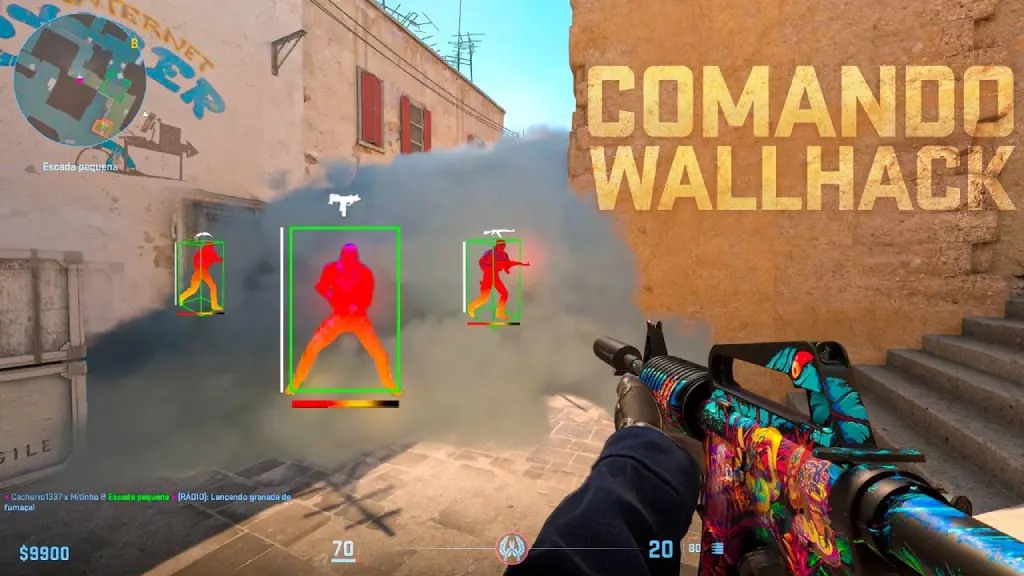
Over time, the term CS2 wallhack also began to refer to built-in console cheat commands. Some of them have the same functionality as the regular wallhack CS2 cheat, but there is no ban for using them. This is because they are only available in limited game modes, which we’ll list below.
Is the CS2 Wallhack Command a Cheat?
No, the CS2 wallhack command is not a cheat. This command is a built-in feature provided by the developers. It was used for various game tests even before the game’s official release.
It’s simply impossible to gain any in-game advantage with this feature. It doesn’t work in official matchmaking. Therefore, the CS2 WH command itself, like all other sv_cheats commands, is completely safe to use.
How to Enable sv_cheats 1 in CS2
Before enabling sv_cheats and WH in CS2, please note that this is only possible in the following modes:
- Offline match with bots
- Local server (Practice Mode)
- Private lobby with friends (if you have host rights)
- Custom maps / workshop maps
- Training modes (aim, prefire, etc.)
All other CS2 game modes will simply ignore unauthorized commands.
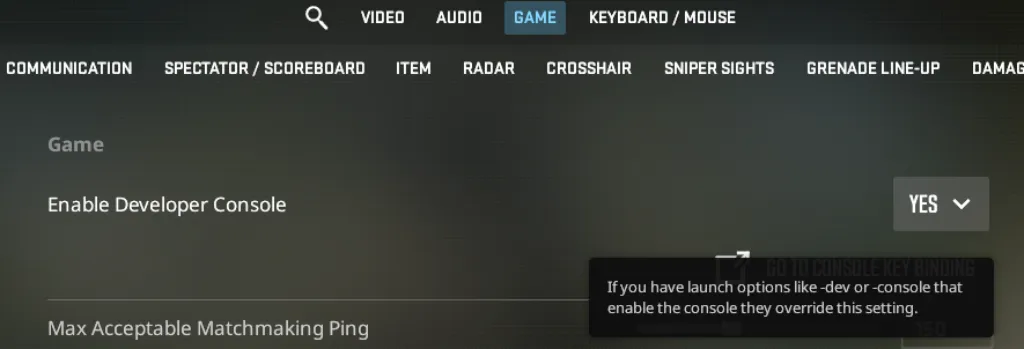
Also, to enter any of the commands, you must enable the CS console:
- Open Settings
- Go to the Game tab
- Find Enable Developer Console (~)
- Set it to Yes
- Press the ~ key to open the console
After this, you can enter any of the sv_cheats-enabled modes and enter the following into the console:
- sv_cheats 1
Best CS2 Wallhack Commands in 2026
The game offers three different console WH approaches. All are activated via sv_cheats 1 and are legal. The only differences are in the visualization type (skeleton/hitboxes). We’ve described all CS2 wallhack commands and the differences between them in separate sections.
CS2 Wallhack Command With ent_skeleton
The most popular and informative wallhack CS2 command is ent_skeleton. It is often used for position analysis. Basic commands:
- ent_text PLAYER
- ent_clear_debug_overlays
- ent_skeleton PLAYER
- ent_skeleton NUMBER
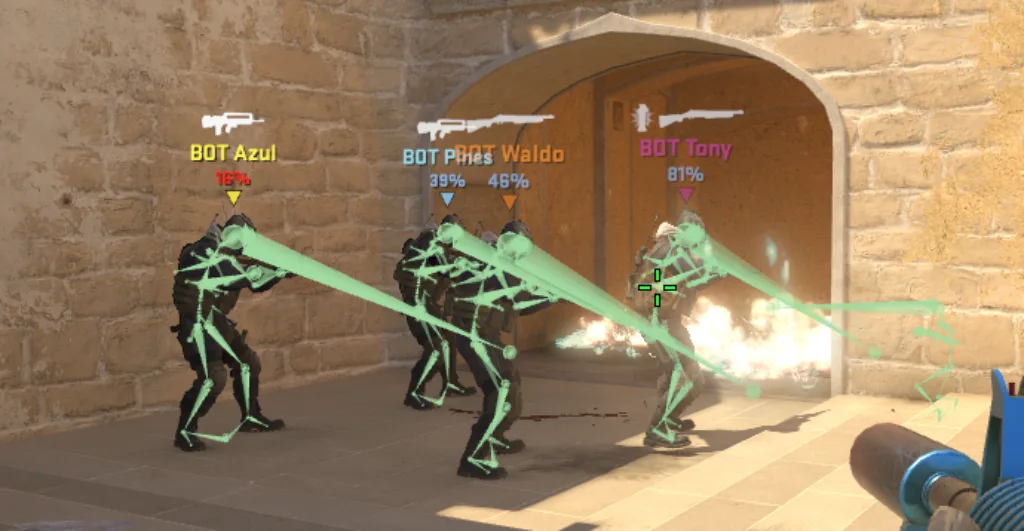
First, the player entity ID is determined using ent_text PLAYER. Then, skeletons must be enabled using ent_skeleton PLAYER. After this, you can optionally hide your own model using ent_skeleton NUMBER.
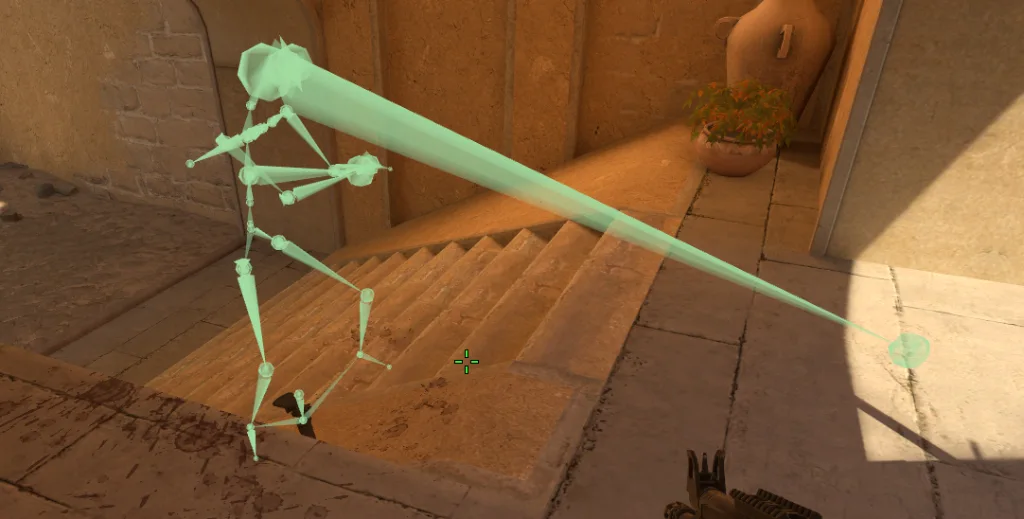
As for the WH command CS2 itself, it visualizes the player model’s wireframe (bones). This provides the most accurate representation of the enemy’s position behind the wall; however, skeletons may remain frozen on the map after death. This creates visual noise, so it’s not suitable for everyone.
Alternative CS2 Wallhack Command With cl_ent_skeleton
For those who don’t want to bother with player-specific commands, there’s another CS2 console wallhack command:
- cl_ent_skeleton c_cs_player_for_precache
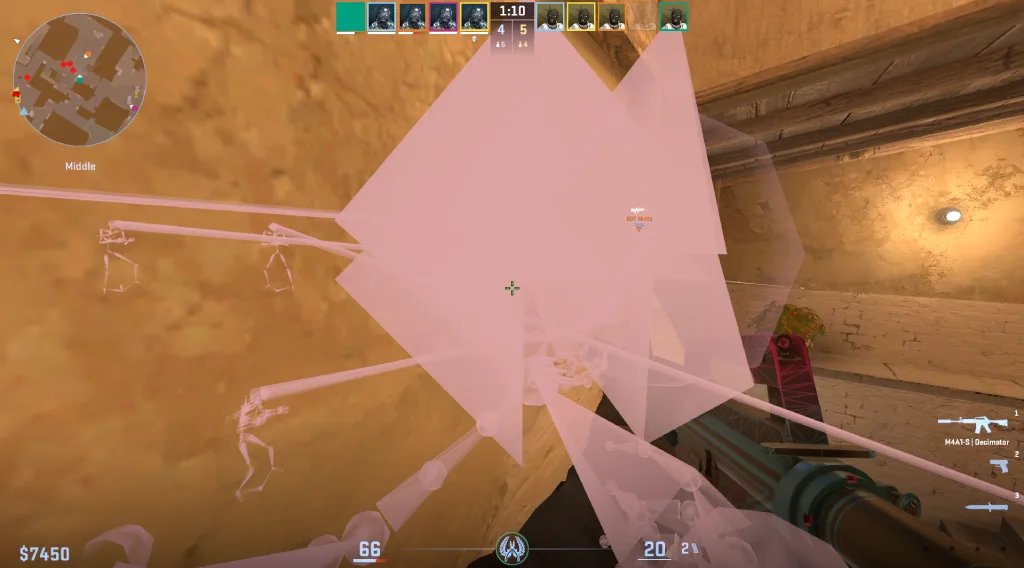
It applies the WH effect to all characters at once. This may be more convenient, but it’s important to keep in mind that this command works with the model renderer, not with players. This means it takes data from the client-side (visuals), not the logic. The effect applies to everything:
- Current models
- Remnants of models
- Animation layers
This can lead to unnecessary visual artifacts (lines/lasers). Therefore, the visualization of this skeleton WH CS2 command is rougher compared to ent_skeleton.
CS2 Wallhack Command With cl_ent_bbox
The third option is to use the wh command:
- cl_ent_bbox (in this case you need to aim the sight at the player or his corpse)
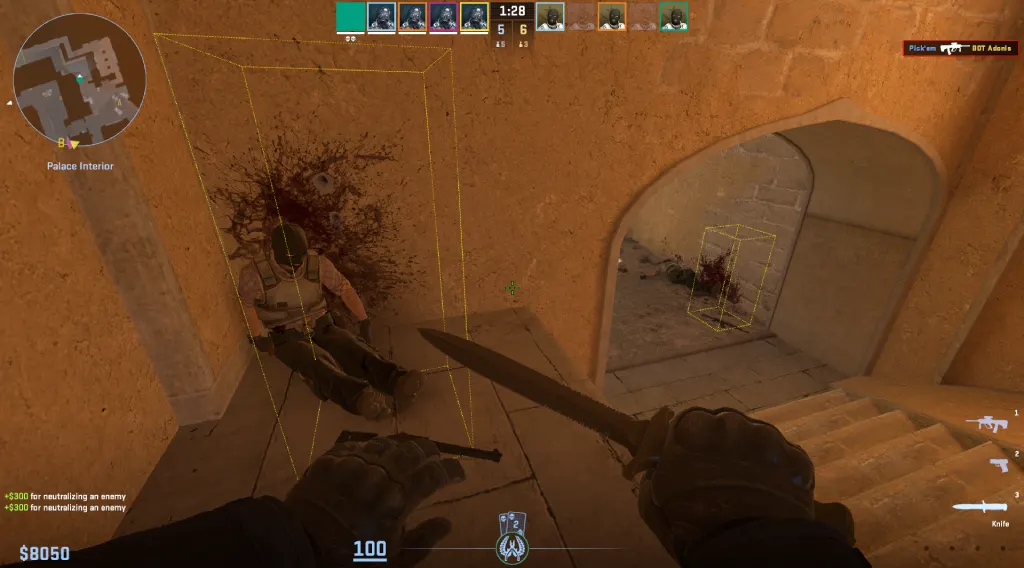
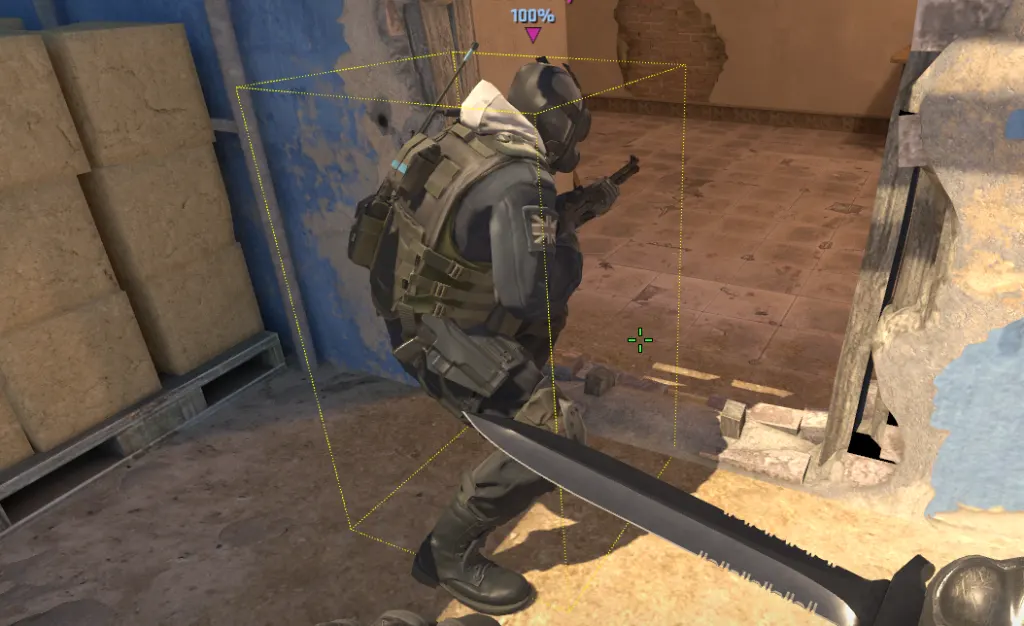
Its effect is slightly different from the previous two. Instead of bones, bounding boxes (hitboxes) are displayed. This is a rectangular area within which the player’s model is located. Essentially, it’s a complete visualization of how the game sees the player in terms of hits.
This CS2 hitbox wallhack command is best used for:
- Analyzing angles
- Studying model widths
- Training wallbang positions
- Understanding peeks
As for drawbacks, this wallhack CS2 console command lacks visual clarity. Geometric boxes are perceived much worse visually. For beginners, this can be a huge drawback, making this command ineffective.
Step-by-Step: How to Use the CS2 Wallhack Command
To avoid common mistakes, we’ve prepared a step-by-step guide on how to use wallhack commands CS2:
- Enable the developer console: Make sure the console opens when you press the (~) key or another key. Without it, you simply won’t be able to enter commands.
- Start an offline or private match: WH commands don’t work in official modes. Create a game with bots or join a local server.
- Enable cheat mode: Open the console and enter “sv_cheats 1“. This will enable access to all CS2 practice commands.
- Enter the wallhack command: Select one of the methods described above and enter it in the console.
- Test with bots: Add bots or use existing ones. Observe how they move, what positions they occupy, etc.
How to Remove or Turn Off the CS2 Wallhack Command
If you want to return the match to its normal state after training with CS2 WH, enter the following in the console:
- ent_clear_debug_overlays
and/or
- cl_ent_clear_debug_overlays
The first removes most elements created via the ent_* command, and the second via cl_ent_*. However, some overlays may be from different sources, so to be safe, you can use both commands at once.
What Can You Practice With the CS2 Wallhack Command?
There are many reasons to use the CS2 wallhack console code. Some simply want to try something new for fun, but most players use WH as a learning tool. It can help you improve:
- Pre-fire (pre-aim) of popular angles: With CS2 WH, you can see the exact position of the enemy behind the wall and learn where to aim. With practice, this will build muscle memory for standard positions.
- Wallbangs (wall shots): Some surfaces in the game are easily shot through. Using a wallhack, you can accurately determine whether a model can pass behind an object and where it is vulnerable.
- Timings and rotations: With WH, you can calculate how long it takes players to reach certain points on the map. This allows you to anticipate enemy spawns at different spawns.
- Positioning on the map: The positions are not at all ideal. In some positions, a player can be seen earlier than initially expected. Using WH, you can learn such covers.
Risks of Using Wallhack in CS2 Online Matches
Some players consider themselves “smarter” than others and decide to search for a CS2 wallhack download cheat. This is a completely different thing than a built-in practice command. Installing such software can easily result in a permanent VAC ban. Along with this, you will also lose access to your inventory and the marketplace. This means that skins will be permanently bound to your account and cannot be transferred or sold.
Also, when you download wallhack CS2, you may not notice how other malware is installed on your PC. This could include viruses, keyloggers, and even potential Steam account hijackers. We are confident that you don’t need any of this, so please do not resort to installing real cheats. The consequences could be catastrophic.
Conclusion: Should You Use the CS2 Wallhack?
It all depends on you. If you’re interested in the wallhack CS2 console command as a learning tool, we see no reason not to use it. It’s a truly great tool that can help you better understand the map, positions, and even player/bot behavior. Knowledge can give advantages and this is very relevant in the case of WH.
If you’re thinking about WH CS2 cheats, we can confidently say we’re against it. Any attempt to use such software can result in a ban. Practice real skill, rather than resorting to unfair manipulation.
FAQ
There are various CS WH commands. They are all used via sv_cheats 1. The most popular is ent_skeleton, as entering this command will give you the clearest visualization of player skeletons. The other two commands, cl_ent_skeleton and cl_ent_bbox, also work, but either provide more artifacts or only show hitboxes.
No, the r_drawOtherModels 2 doesn’t work in CS2. It simply wasn’t carried over from CS:GO. Three other commands from our guide are suggested as alternatives.
No, there’s no ban for using sv_cheats 1. It’s a built-in command by the developers, and they’ve designed it to be unusable in official matches. It only works on private servers or offline.
To disable wallhack, you need to clear debug overlays. This can be done using the ent_clear_debug_overlays or cl_ent_clear_debug_overlays commands. For reliability, it’s best to use both together.
Read also: