mn
mn  ru
ru 
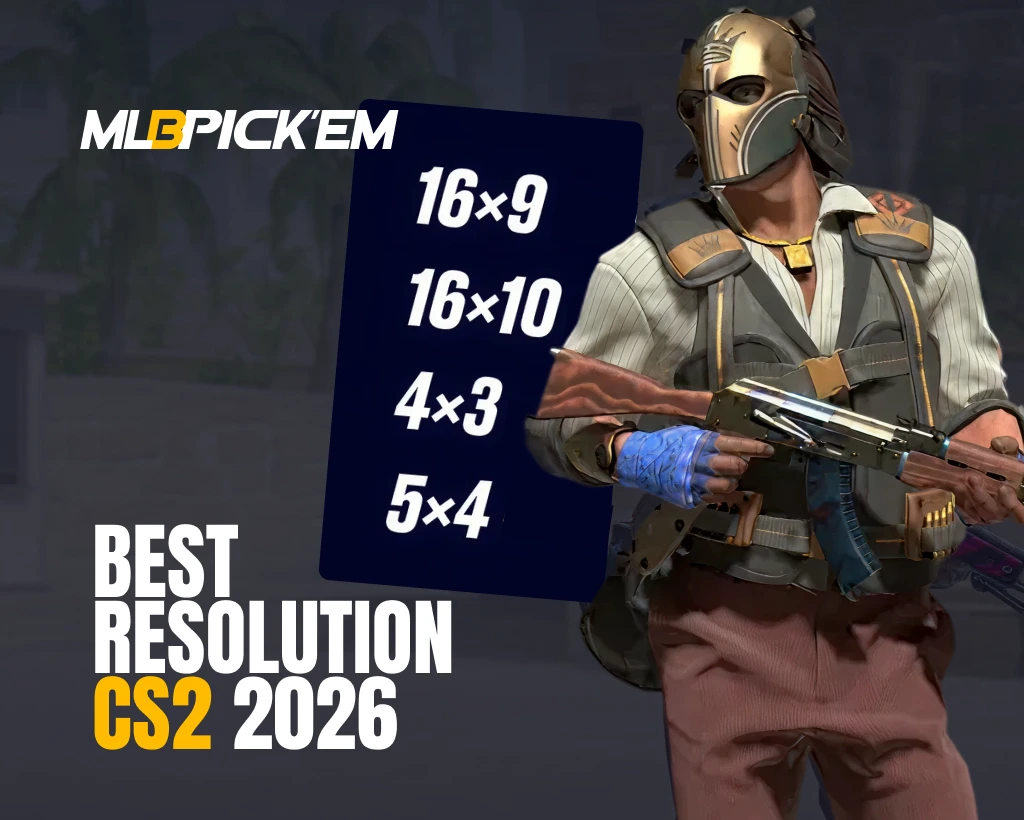
Best Resolution for CS2 in 2026
In many games, players choose resolutions based on the principle of “I’ll set the highest my PC can handle.” However, experienced Counter-Strike 2 players know that this approach doesn’t work in this game. CS2 resolution affects not only image quality but also model size, silhouette visibility, field of view, and, of course, FPS. Therefore, even high-end PCs deliberately use lower and non-standard resolutions. In this article for MelBet Pick’em, we’ll explain the differences between popular resolutions. By the end of the article, you’ll know everything about resolutions and be able to choose the best CS2 resolution for you!
Understanding CS2 Resolution and Aspect Ratios
Resolution in CS2 is the number of pixels the graphics card renders to form each frame. The higher the CS2 resolution, the sharper the image, but the graphics card also has to process more pixels, which can result in a drop in FPS due to high CS2 GPU load.
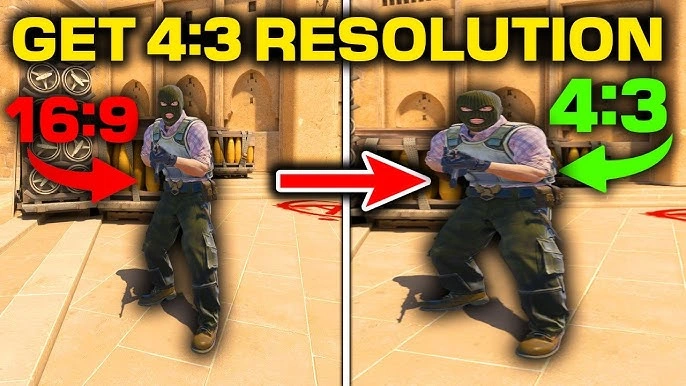
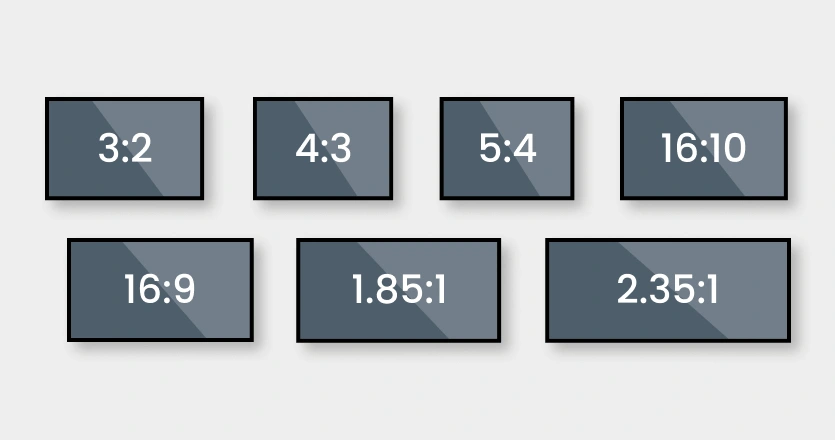
Also, any player should know that, in addition to CS2 resolution, it is also worth knowing what aspect ratio is. This determines how the pixel grid appears visually. It can be wide or square. For example, the most popular CS2 resolution is 1920×1080. This pixel grid appears wide because it has a 16:9 aspect ratio. In contrast, the 1280×960 resolution, which is familiar to some, has a 4:3 aspect ratio, making the image appear more square.
Why Resolution Matters in CS2
Before we move on to specific examples and defining the best CS2 resolution, it’s worth discussing why it’s important. Yes, image quality and GPU load are generally clear. But there are many other reasons why CS2 resolution is a crucial setting.
Let’s try to consider resolution not just as “image quality,” but as a fundamental variable that influences three key components:
- FPS: High resolution increases detail and overall CS visual clarity, which increases the number of pixels the GPU must process. This increases frame rendering time and reduces CS2 FPS. In this regard, the lower the CS2 resolution, the better for FPS.
- FOV (Field of View): Although the FOV in CS2 is fixed at the engine level and cannot be changed directly, resolution, in conjunction with the aspect ratio, actually changes the actual perception of the game space. Moreover, it is the aspect ratio, not the number of pixels, that affects the FOV. We’ve prepared a more detailed comparison with examples in the sections below.
- Opponent model geometry: this is one of the most underrated aspects of CS2 resolution. Resolution + aspect ratio change the visual geometry of the model, but not the hitbox. This means that the game physics remain the same, but the model may become visually wider or thinner.
Aspect Ratios Explained: 4:3, 16:9, 16:10
As we’ve noted, the CS2 resolution itself has a greater impact on FPS. However, the CS2 aspect ratio affects FOV and other important factors. A properly selected best aspect ratio for CS2 affects:
- How much lateral information you see (peripheral vision).
- How wide or slim the enemy model will be (perceived size).
- How the model’s movement and acceleration are perceived (motion feel).
- How much peripheral vision is loaded.
Most duels in CS2 are decided in the first 160-250 ms of visual processing. And these four factors can have a significant impact on reaction time.
4:3 Stretched vs. 16:9 Native vs. 16:10 — Detailed Comparison
We’ll examine all three best CS aspect ratios in detail, but first, we recommend checking out the comparison chart. It clearly shows the advantages of each aspect ratio CS2.
| Parameter | 4:3 Stretched | 16:9 Native | 16:10 |
|---|---|---|---|
| FOV | Narrow, highly concentrated | Widest possible FOV | Slightly narrower than 16:9 |
| Perceived Model Size | Widest, easiest targets | Thinnest silhouette | Medium |
| FPS | Highest performance | Lowest on weaker GPUs | Moderate |
| Visual Clarity | Lower clarity, but excellent silhouette reading | Best overall clarity and detail | Higher than 4:3, lower than 16:9 |
| Peripheral Vision | Limited | Wide peripheral coverage | Moderate |
| Tracking Difficulty | Easiest – wide models simplify tracking | Hardest – thin models require precision | Medium |
| Aim Comfort | Strong focus on center, minimal visual noise | Maximum peripheral overload | Balanced |
| Motion Feel | Fast, linear movement perception | Smoother, more natural motion | Compromise |
4:3 Stretched — Why Most Pros Still Use It
Despite the era of “square” monitors ending in the mid-2000s, CS2 4:3 resolution is still actively used. And it’s not just people who can’t afford better monitors who use it. Approximately 59% of professional players still play with 4:3 resolution in CS2, most often at 1280×960. There are still many reasons to use CS2 4:3 resolution:
- Visually enlarged models: Silhouettes become wider, heads appear larger, and hit zones are easier to read dynamically. This doesn’t change the hitbox, but it speeds up visual target identification.
- Maximum focus in the central zone: With a narrow FOV, there are fewer lateral distractions. You literally force your eyes to focus on the area where the duels are taking place.
- Stable muscle memory: Most pros grew up with 1.6 and CS:GO, where 4:3 was the norm. Their neural aiming mechanics are optimized for this geometry.
- High FPS on any system: 4:3 almost always renders fewer pixels → more frames → less input lag.
16:9 Native — Best Visual Quality
The most popular resolution (not to be confused with the best resolution for CS2) is, of course, 16:9. It’s what most non-professional Counter-Strike 2 players use. The 16:9 aspect ratio is the standard for modern gaming, and it has several advantages:
- Widest FOV: You see more to the sides. This is essential for support positions, scouting, and information-based play.
- Maximum visual clarity: Especially at 1920×1080 or 1440p. The image has sharp edges and better pixel readability at long distances.
- Ideal for streamers and content creators: No one will argue that 16:9 images look better than 4:3. The HUD is optimized specifically for native 16:9.
- Natural motion feel: The model’s movement speed feels realistic, without acceleration/stretching.
16:10 — The Compromise Option
While few have heard of this resolution in 2026, it was once very popular. It appeared on the mass market around 2003. By 2008, the 16:10 format had become the most common format for LCD monitors and laptops.
It’s a compromise between the classic 4:3 aspect ratio and the widescreen 16:9. It offers more vertical space for working, but was supplanted by the 16:9 standard due to the standardization of HDTV video.
Those choosing the CS2 16:10 resolution in 2026 do so for several reasons:
- Wider than 4:3, but more compact than 16:9: Ideal for those who need a balance between peripheral vision and concentration.
- Models appear smaller than in 4:3 but larger than in 16:9: This simplifies tracking without compromising readability.
- Optimal for mid-range systems: At resolutions like 1680×1050, FPS is usually higher than in Full HD.
- Convenient for those who have never played in 4:3: It’s easier to adapt to than switching from standard 16:9 to narrow 4:3.
Best CS2 Resolution Based on Pro Players
We’ve already noted that average players most often use 16:9. But determining the best CS2 resolution based on millions of average players isn’t entirely accurate. It’s better to look at the pros. So, based on more than 600 professional Counter-Strike players, we determined the most popular CS2 resolutions. And we believe this data can be used to determine the CS2 best resolution:
| Aspect Ratio | Pro Usage | Short Comment |
|---|---|---|
| 4:3 Stretched | 59% | Widest perceived models, best aim comfort |
| 4:3 Black Bars | 16% | Narrow FOV, strong central focus |
| 16:9 Native | 12% | Best visual clarity and widest overall FOV |
| 5:4 Stretched | 4% | Very narrow FOV, niche, and highly specific feel |
| 16:10 Stretched | 4% | Balanced option between 4:3 and 16:9 |
Examples of Popular Pro Configs
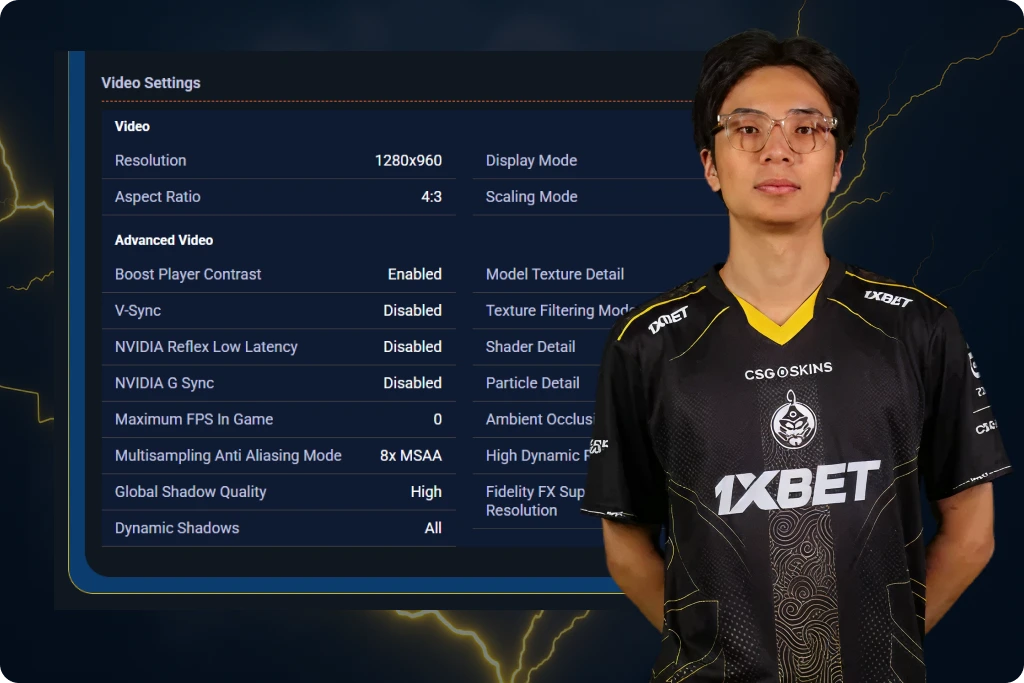
To further determine the best resolution for CS2, it’s worth looking at specific examples. Many players focus on top professional players from teams like Vitality, Na’Vi, and so on.
And yes, this makes sense. Looking at the majority of casual players, it’s difficult to determine a clear picture, as many use specific resolutions due to their weaker PCs. After all, CS2 system requirements in 2026 are quite high.
Professional players, however, have high-end graphics cards like the RTX 5080. They clearly don’t choose the best resolution for CS2 based on FPS.
Best CS2 Resolution Based on Your PC Specs
We’ve already discussed absolutely everything you need to know about the best CS2 resolution, except for… specific examples for different PC specifications. Yes, if you’re a fan of 4:3 and appreciate the benefits this resolution offers, you can go for it. This CS2 resolution is suitable for absolutely all systems that meet the game’s minimum system requirements. However, if you prefer a bright and colorful image, below we’ve provided recommendations for each PC class, based on real-world benchmarks.
Powerful PCs (RTX 4070/RX 7800 XT and above)
On graphics cards of this level, the higher pixel count doesn’t affect CS2 FPS stability at all. You can use absolutely any resolution supported by your monitor. Alternatively, return to the CS2 resolution comparison table and choose the ones whose advantages are most important to you. The recommended ones are as follows:
- CS2 Resolution: 1920×1080 or 2560×1440.
- Aspect Ratio: 16:9.
Mid-Range PCs (RTX 3060/RX 6600)
Mid-range graphics cards are the most resolution-sensitive in CS2. It’s important to look at not only FPS but also frame rate stability. While the RTX 3060 / RX 6600 seem to be very good graphics cards, significantly better than those listed in the system requirements, even these cards often experience microlags in demanding scenes. Therefore, the best CS2 resolutions for systems with these GPUs are as follows:
- CS2 Resolution: 1680×1050 or 1920×1080.
- Aspect Ratio: 16:9.
Low-End PCs (GTX 1650 and below)
For low-end PCs, there’s an objectively better option: 4:3 stretched. Yes, it doesn’t look very good visually. However, its advantages and good FPS on lower-end systems outweigh the visual drawbacks. And remember, most professional CS2 players use this resolution. It’s not for nothing that many consider it the best resolution for CS2.
- CS2 Resolution: 1280×960 or 1024×768.
- Aspect Ratio: 4:3 Stretched.
How to Change Resolution and Aspect Ratio in CS2
Changing the CS2 resolution and aspect ratio is very easy. Sometimes you don’t even need to launch the game; you can use the CS2 launch options. However, most users still use the default in-game settings. They are a little more convenient and, unlike launch options, it is impossible to make a mistake with them. To set the best resolution for CS2, follow these steps:
- Open CS2 and go to the settings: After opening the game, find the Settings menu in the upper left corner. It looks like gray gear.
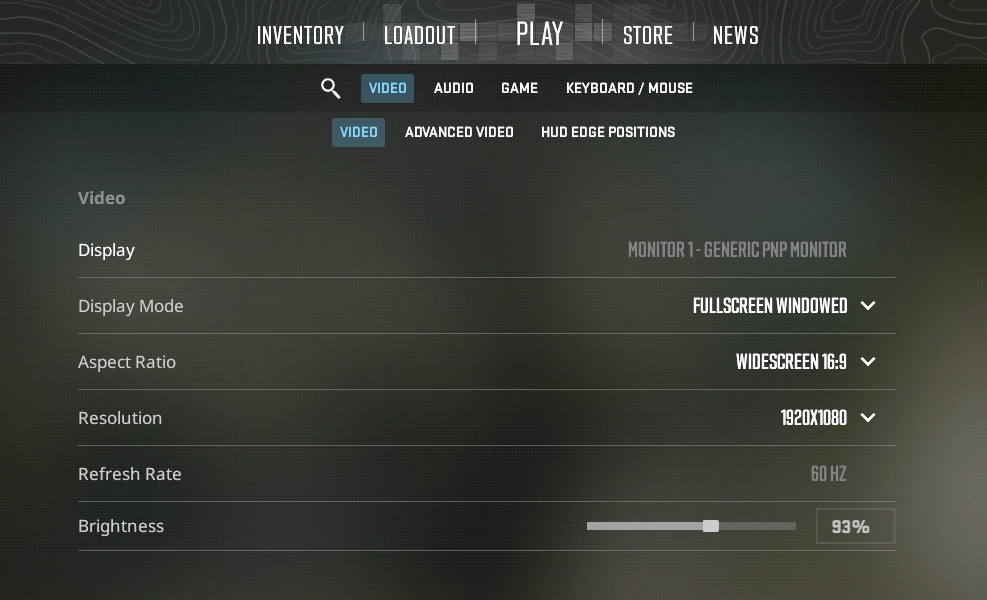
- Select a display mode: After clicking the gear, the View Settings will immediately open. Select Display Mode. We recommend using Fullscreen, as it provides the lowest input lag.
- Select an aspect ratio: Three options are available: 4:3, 16:9, and 16:10. Carefully read the comparison table with the advantages of each of these CS2 resolutions and make your choice.
- Select a resolution: The available options depend on the aspect ratio. For 4:3 → 1280×960, 1024×768; for 16:9 → 1920×1080, 1600×900; and for 16:10 → 1680×1050, 1280×800.
- Configure GPU Scaling: This step is only necessary if your selected aspect ratio differs from your monitor’s aspect ratio. Without this step, 4:3 on a 16:9 monitor will display with black bars, not a stretched display. To configure this, open your graphics card’s control panel – NVIDIA Control Panel, AMD Adrenalin, or Intel Graphics Command Center. There, you’ll find a section related to display scaling (Display / Scaling / Adjust Size and Position). In this menu, set the scaling mode to Full Screen and be sure to select the Scaling performed by GPU or GPU Scaling option if available.
Final Verdict — What Is the Best CS2 Resolution in 2026
To summarize, the best CS2 resolution for most players in 2026 remains 1280×960 (4:3 Stretched). This resolution provides the optimal balance between model width, good FPS, and comfortable shooting. It’s no wonder that half of professional players play CS2 at 4:3 resolution.
On the other hand, we believe the developers have made a real difference in making the game beautiful. To truly appreciate this beauty, you need to play at 16:9, the highest resolution available for your monitor. Therefore, if you don’t particularly care about the advantages of 4:3, we believe the best resolution CS2 will be the one your monitor and graphics card can handle. The game’s graphics are very polished in 2026, and you shouldn’t miss out on this. But the choice is yours: choose the best CS2 resolution that suits you best and enjoy the game!
FAQ
In 2026, the best resolution for CS2 remains 1280×960 (4:3 Stretched). It offers many advantages, including larger models, extremely stable frame rates, and minimal input lag.
Because 4:3 Stretched visually expands the model, speeds up its recognition, and makes tracking easier. It’s also very suitable for low-end PCs due to its reduced GPU load. This results in smoother frame rates and better responsiveness in dynamic situations.
For low-end systems, the best option is 1024×768 or 1280×960 (4:3 Stretched). The formula is quite simple: the fewer pixels, the higher the frame rate. This is important not only for smoothness, but also for more stable aiming responsiveness even under high load.
The higher the resolution, the more pixels the GPU renders, increasing frame times and lowering FPS. Lowering the resolution directly increases the frame rate and reduces input lag by reducing the computing load.
Yes, 1440p significantly reduces FPS compared to 1080p. 1440p (2560×1440) has 1,612,800 more pixels than 1080p (1920×1080). This is a 77.8% increase, as 1440p contains 3,686,400 pixels, while 1080p contains 2,073,600. Because significantly more pixels are rendered, only graphics cards of the RTX 4070 and above can provide stable performance at 1440p.
Read also: