mn
mn  ru
ru 
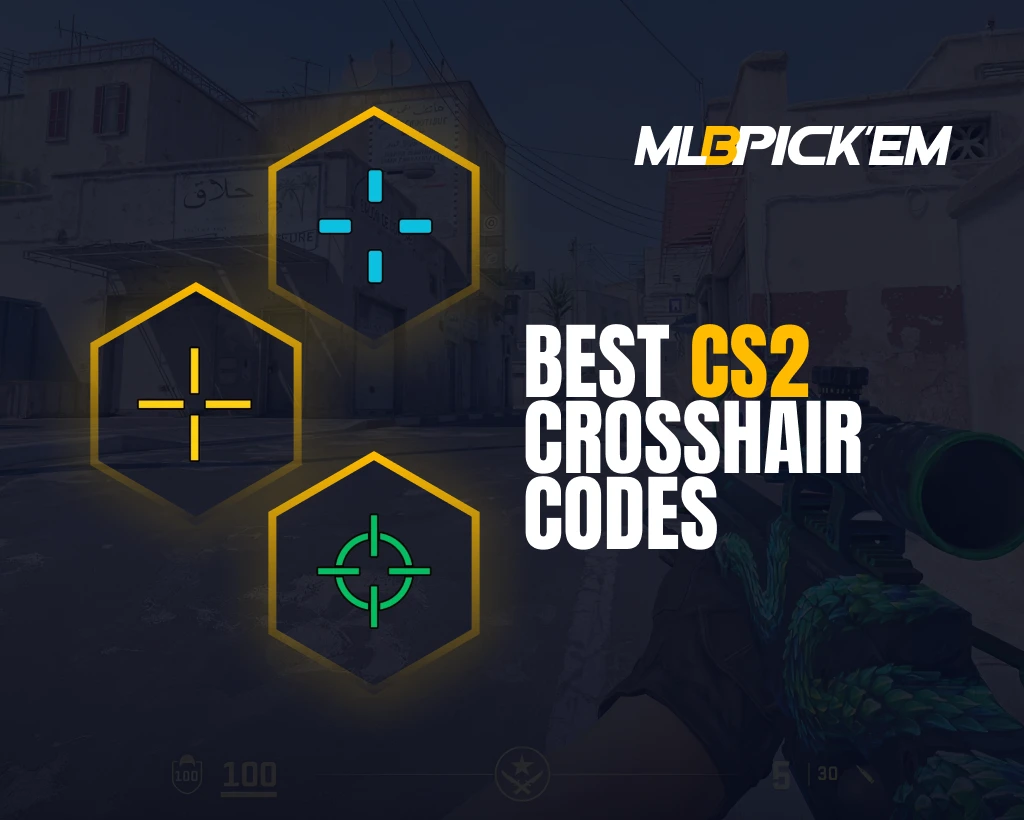
Best CS2 Crosshair Codes to Use in 2026
It’s hard to imagine Counter-Strike 2 without a crosshair. It plays an incredibly important role in every aspect of shooting. But did you know that simply having a CS2 crosshair in the center of the screen isn’t enough? It can and should be customized, and the number of available options in CS2 amazes even experienced players.
In this article for MelBet Pick’em, we’ll explore the best crosshair codes CS2 for 2026. We’ll explain every important crosshair customization option in detail. Be sure to read the article to the end and take the time to customize your crosshair CS2. You’ll feel the difference in your very first match!
Why Your CS2 Crosshair Matters in 2026
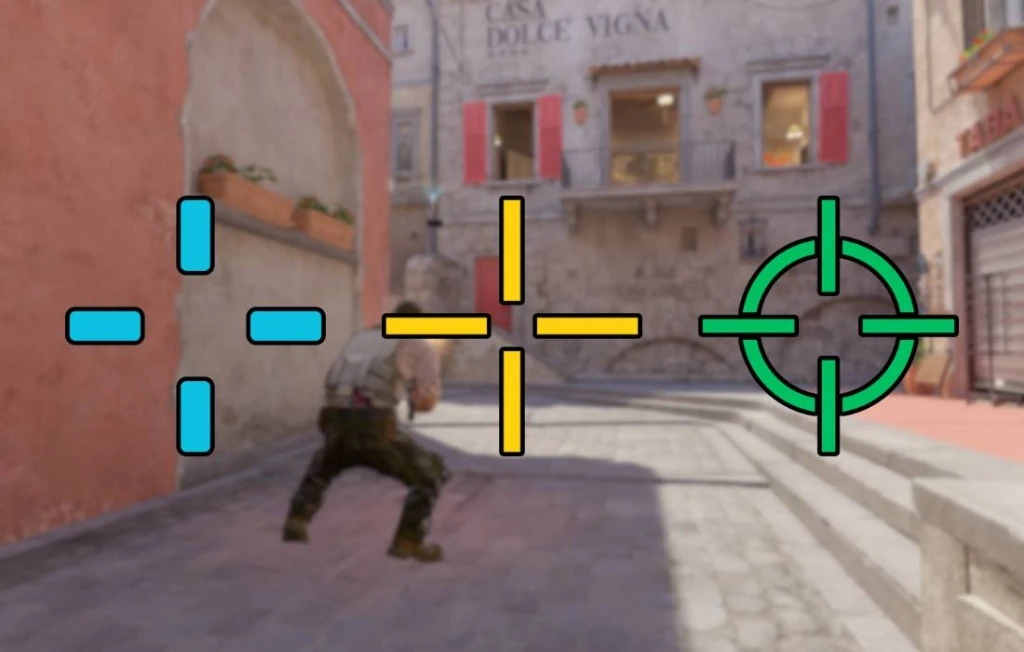
Crosshair in Counter-Strike 2 is a visual aim calibration tool. Simply put, it’s a fixation point in the center of the screen through which the brain synchronizes visual perception and muscle micromovements.
When properly configured, crosshair CS2 can minimize visual noise, thereby increasing the predictability and repeatability of shooting. When poorly configured, the opposite is true. Excessively large, low-contrast, or dynamic CS2 crosshair can reduce shooting accuracy and increase decision-making speed.
What Makes a Good Crosshair in CS2?
We think there are no more questions about what CS2 crosshair is. But how exactly it can be effective isn’t clear to everyone. Many still think it’s just a dot in the center of the screen, and that various CS2 crosshair settings are a waste of time.
For these readers, we’ve prepared a whole list explaining what the best CS2 crosshair should be and how it can affect:
- Decision-making speed: A good CS2 crosshair speeds up visual enemy detection. It reduces the delay between detecting an enemy and starting to aim. The higher the contrast in the center, the faster the brain interprets information, and sometimes even milliseconds can be critical.
- Pre-aim and angle-holding stability: The crosshair should allow you to confidently maintain head level and micro-angles without unnecessary adjustments. If the crosshair is too large or blurry, this increases focus drift and reduces the accuracy of the first bullet.
- Reduced cognitive load: A clear, minimalist crosshair CS2 reduces visual “noise.” This frees up brain power for analyzing enemy positions, grenades, and timing. Excessive crosshair design creates unnecessary distractions and slows reaction times.
- Contrast with most in-game background textures: Color should remain visible on any map. CS2’s high-contrast crosshair ensures faster enemy silhouette recognition, even in complex, well-lit environments.
CS2 Crosshair Types Explained
As of early 2026, there are six CS2 crosshair types in the game. Each is different, each suited to its own purpose and has its own advantages and, of course, disadvantages.
These different options offer varying degrees of control, information content, and stability. To choose the best CS2 crosshair for you, you need to understand the features of each type. This will allow you to choose a crosshair that will enhance your shooting style.
Static
A static crosshair does not change while moving or shooting. This provides a fixed point and eliminates unnecessary movement on the screen. Incidentally, most professional CS2 players choose a static crosshair due to its predictability and aiming stability.
Dynamic
A dynamic crosshair expands when shooting and moving. On the plus side, this crosshair type visually indicates the decrease in accuracy. This is very useful for beginners as a learning tool. However, if you’re no longer a beginner and have a good understanding of CS2’s shooting mechanics, this type of crosshair will create unnecessary noise and slow down your decision-making.
Dot
Dot crosshairs CS2 are minimalism in their purest form. This is a good option for players with perfect aiming discipline and good micro-aiming. It provides maximum first-round accuracy, but it’s not without its drawbacks. This scope requires impeccable control of movement and positioning; it does not forgive mistakes in this regard.
T-Style
This is essentially a standard static CS2 crosshair, but without the top bar. This is where the name “T-Style” comes from, as if the top bar on the “+” were removed, it would resemble the letter “T.” As for the crosshair itself, removing the top bar improves the visibility of pixel angles and makes it easier to lock onto an opponent’s head in vertical duels. This option is preferred by aggressive players who value quick model identification.
Follow Recoil
This type of sight can be very useful for beginners. It mimics the recoil motion, showing the spray trajectory and allowing one to learn the pattern structure. However, in real matches, it offers little practical value; rather, it imposes a high cognitive load.
Circle/Hybrid
Ring and hybrid crosshair options combine the advantages of a classic CS2 crosshair and a dot sight. The center remains clearly visible, while additional elements provide spatial orientation. This type of sight may be suitable for players who require high center readability without sacrificing a broad visual structure.
Best CS2 Crosshair Codes Used by Pros 2026
Many believe that when it comes to choosing the best crosshair for CS2, you should definitely look at professional players. We believe this is not entirely accurate. Yes, professional players certainly won’t use bad CS2 crosshair codes. But crosshair is a very individual thing, it needs to be chosen to suit yourself.
However, we still can’t help but show you some CS2 pro crosshairs. After all, sometimes you can just click through ready-made options and find something suitable. We recommend trying each of the pro crosshairs CS2, playing with it for at least 15 minutes, and then making a decision.
| Player | Team | Crosshair Code 2026 |
|---|---|---|
| ZywOo | Vitality | CSGO-bJdWd-mehBT-OQtne-Gu7hb-5bq3B |
| Techno4K | The MongolZ | CSGO-wYFFt-vECHC-Rq7tQ-JUdfw-5OeZH |
| Brollan | MOUZ | CSGO-FnJLE-pUbZP-vnNr4-OEcBH-2zpxA |
| KSCERATO | FURIA | CSGO-ufZUO-V27Te-WQRmC-LhG9C-6AU8N |
| NiKo | Falcons | CSGO-EvvTA-D6U88-mXTHk-acm3G-bkMHA |
| donk | Team Spirit | CSGO-NmcdV-ORLFj-vKC4W-LV6zW-4fWjM |
| m0NESY | Falcons | CSGO-n6ery-bedXS-3ZJOX-3Oxkx-QomHB |
| ropz | Vitality | CSGO-MMQuh-Hs3Sj-Qv9zd-VaCmc-3QqNO |
| Twistzz | FaZe | CSGO-OComx-ewftc-UrLZC-JDPjx-Pd74E |
| dev1ce | Astralis | CSGO-yUBv6-y5b38-fj2sY-ZvyEc-NCmDA |
| b1t | NAVI | CSGO-Afqyt-BkB8V-XKBPn-wXZY5-6QBUM |
| sh1ro | Team Spirit | CSGO-Zbmp3-4kqXu-2DPfH-QvFVv-QomHB |
| Ax1Le | BetBoom | CSGO-erEE8-Hxekb-RjPud-SFZpG-2e7iL |
| XANTARES | Aurora | CSGO-xbpe2-E24RJ-YXNuO-pQvt8-ppNAK |
| Magisk | Astralis | CSGO-qzxDW-GjAPy-PGJY8-tPYPi-SHjeC |
| apEX | Vitality | CSGO-US8wR-VECem-xkyHs-Vz5CY-wwXsO |
| malbsMd | G2 | CSGO-MQYLm-nK5pN-DtXZW-KkmSV-OP3ED |
| YEKINDAR | FURIA | CSGO-CBO9K-Nev5f-DkCEb-Hj7uY-OnMHA |
| EliGE | Team Liquid | CSGO-PKWyV-5oamM-nMF2Q-wQZzG-UTOAK |
Universal CS2 Crosshair Presets for Any Player
For those who don’t want to test pro CS2 crosshair codes, we’ve prepared several universal codes. These are suitable for those who don’t like experimenting but simply want a decent crosshair. Each of these best crosshair CS2 options is selected based on the principle of maximum effectiveness in its category.
Beginner-Friendly Crosshair
The first CS2 crosshair code is ideal for beginners; it has all the characteristics this type of player needs:
- A clear center and short beams.
- The blue color maintains visibility on light surfaces.
- Minimal visual noise.
CSGO-oV9ek-WLnpH-QnkrJ-aFsxu-8Er7C
High-Visibility Crosshair
The following universal solution is suitable for players who experience issues with CS2 crosshair visibility on complex textures. The advantages of this CS2 crosshair code are as follows:
- Maximum contrast.
- Thick lines provide a secure center lock.
- Good for aggressive play.
CSGO-usVDK-dBUVN-j4Ffp-POw9z-DLpYF
Precision/Headshot Crosshair
For those who enjoy first-bullet discipline, micro-angles, and precise aiming clicks, we also selected a suitable crosshair CS2 code that features:
- Thin lines and a solid center.
- The turquoise color provides good readability.
- Doesn’t obscure the opponent’s model.
CSGO-s5Qbj-nvF89-cJjDd-mRdSG-5Yt4N
Pro-Level Minimalistic Crosshair
The last of these four best CS2 crosshair codes is suitable for players who appreciate minimalism. Experienced players with strong movement control don’t like unnecessary visual noise, so they choose a crosshair with the following characteristics:
- Clean and simple design.
- High visibility on all maps.
- Keeps focus on the opponent’s model.
CSGO-nCfX7-54ue9-aC5eV-6Womf-Q6izO
How to Change Crosshair in CS2
Let’s imagine this: you want to see what a popular eSports player’s crosshair looks like, for example, s1mple crosshair CS2. You took a special CS2 crosshair code from our article or from any other website. But how do you apply it?
It’s very simple. The crosshair CS2 import system was designed to allow for quick and accurate crosshair changes. We’ve prepared three options for changing it. The first will apply to crosshairs found in our article or elsewhere online, and the other two can be tested without searching for codes.
1. Import Through In-Game Menu
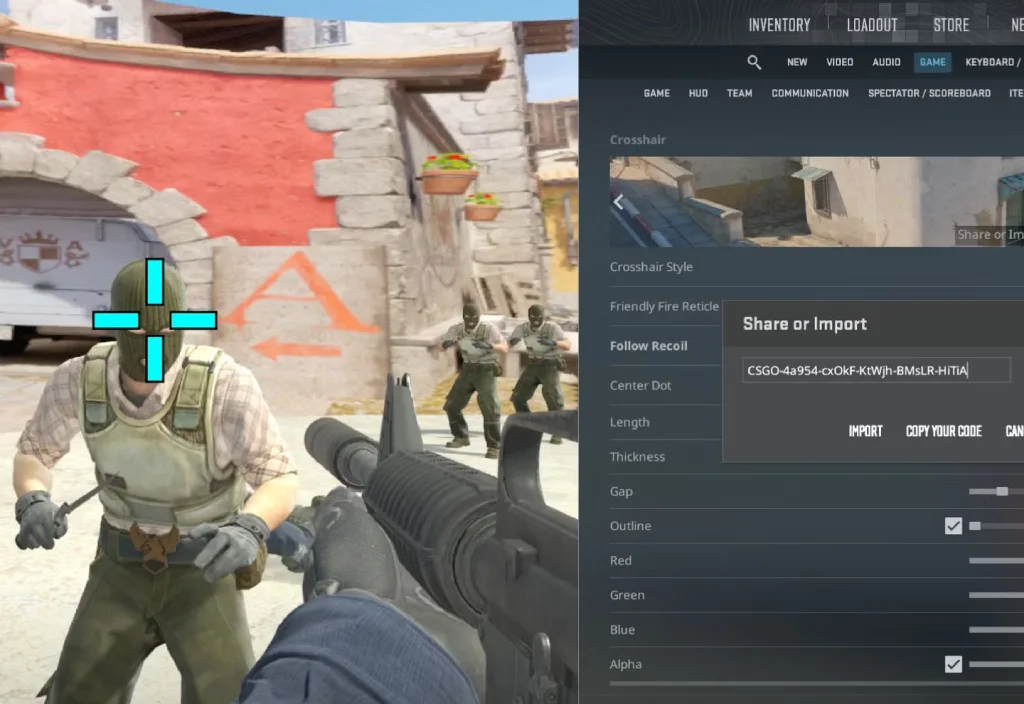
The fastest way to change crosshair in CS2 is through the In-Game Menu. There’s no need to select anything or figure out the best option. Simply take the CS2 crosshair codes from our article and paste them one by one into the menu:
- Go to Settings → Game → Crosshair.
- Open “Share” or “Import.”
- Paste the code (in the format CSGO-xxxxx-xxxxx-xxxxx) and click Import.
2. Import Through Developer Console
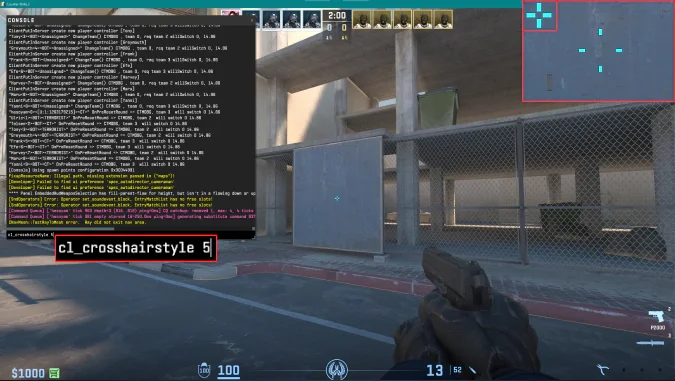
This method allows you to manually change individual parameters without affecting the entire crosshair. It’s useful for those adapting CS2 crosshair to their own mechanics. We’ve prepared a step-by-step guide, including the codes and their operating ranges:
- Enable the console: Settings → Game → Enable Developer Console.
- Open it with the ~ key.
- Enter each of the parameter codes.
- Size (cl_crosshairsize): Operating range: 1.0–3.0. Below 1.0, readability is lost, and above 3.5, the center becomes blurry.
- Gap (cl_crosshairgap): Operating range: -3.5 to 0. Below (for example, -4), the center begins to blend; above 0, the first bullet loses density.
- Line Thickness (cl_crosshairthickness): effective range: 0.5–1.5. Below 0.4, lines are barely visible in action, while above 1.5 they interfere with long-range shooting.
- Outline (cl_crosshair_drawoutline / cl_crosshair_outlinethickness): thickness: 0–1.0. Pros almost always use 0 or 1; it’s no longer used because it eats up the model.
- RGB Color (cl_crosshaircolor 5 + cl_crosshaircolor_r/g/b): range: 0–255. Bright values (180–255) provide better contrast on all maps.
- Dot (cl_crosshairdot 0/1): enabled only for those who strictly use the first bullet or AWP.
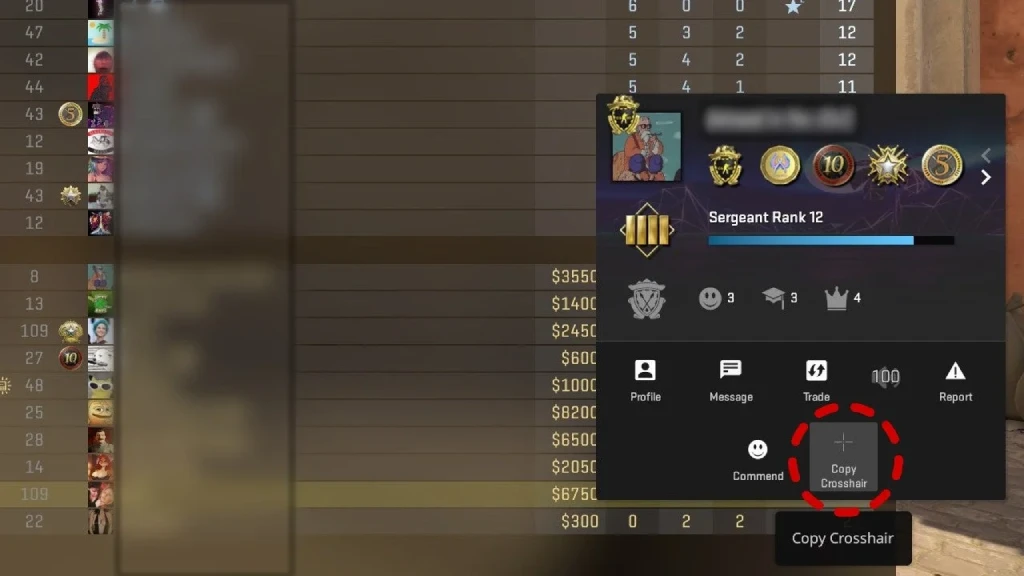
3. How to Copy Crosshair From Another Player in a Match
The next method is even simpler. If you’re playing any mode and see a teammate with good CS2 crosshair settings, you can copy them. This only takes up to 5 seconds:
- Open the TAB panel.
- Click on the player whose crosshair you want to copy.
- Select Copy Crosshair → confirm the change.
How to Customize Your CS2 Crosshair
Didn’t like any of the best pro CS2 crosshairs? Then this section was created especially for you. Here we’ve prepared a description of the crosshair characteristics so you can customize it as quickly as possible.
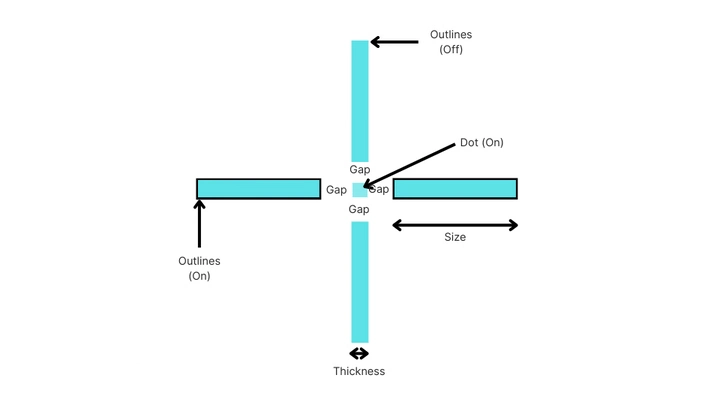
Size (Length of Beams)
Technical range in CS2: 0-100. Gameplay only begins within 1-4:
- Less than 1.0: the lines become microscopic, the center disintegrates, and the crosshair loses its shape.
- 2.0-3.0: the zone of maximum accuracy for riflers at all ranks.
- Above 4: the crosshair becomes a “frame,” obscuring the model and making it difficult to hold the head in place.
Gap
Technical range: -10 to +10. Gameplay effectiveness zone: -4 to 0:
- When the gap is < -4, the center begins to merge into a point, losing visual support.
- Gap -2.5 is one of the most optimal points for first-bullet discipline.
- Gap > 0 – increases the “hole” in the center, making tracking easier but worsening performance at long ranges.
Thickness
Technical range: 0-5. Practical range: 0.1-2.0:
- 0.1-0.4 – ultra-thin lines; good for precision shooting, but easily lost on bright surfaces.
- 0.5-1.5 – optimal range for readability in combat.
- 2.0 – lines begin to cover the hitbox, making shooting unstable.
Outline (Contour)
Technical range: 0-3. Practical range: 0-1:
- 0 – maximum image clarity; used by most pro models.
- 1 – the outline becomes too thick and covers the hitboxes.
Alpha (Transparency)
Technical range: 0-255:
- 255 – completely opaque crosshair; best option for dynamic maps.
- 180-220 – translucent center; reduces visual strain.
- Below 150, the crosshair begins to “blink” on bright objects.
Colors for Map Visibility
Technical range of each channel: 0-255:
- 180-255 – bright values that provide stable contrast on most maps.
- 80-140 – soft colors that are difficult to read indoors and in shadowed areas.
- 0-60 – almost always hidden in dark areas.
The best color for visibility (on all maps) is Cyan (0, 255, 255), or similar shades:
- Yellow – good, but fades on Mirage and Dust2.
- Green – good, but fades on Ancient.
- White – ideal indoors, but falls short on bright maps.
Sensitivity and Crosshair Relationship
Sensitivity and crosshair are a single motor system. For the crosshair to work, its structure must match the mouse movement pattern.
Low Sens (0.6-1.2)
- Requires a tight, compact crosshair.
- A small gap (-2.5) is needed for micro-angle control.
- Thin lines provide better feedback.
Medium Sens (1.3-1.9)
- Universal range.
- Works well with a slight increase in thickness.
- A gap closer to -2 or -1 helps maintain aim during sharp adjustments.
High Sens (2.0-3.5)
- Requires more distinct landmarks (slightly thicker lines).
- A gap closer to 0 prevents the center from “dropping” during flicks.
- The color should be as bright as possible, otherwise the crosshair becomes lost during sharp adjustments.
Best Practice Maps for Testing Crosshairs CS2
Setting your CS2 crosshair is quick and easy, but understanding whether it’s right for you isn’t easy. This requires practice. Testing crosshairs in matchmaking isn’t the best idea, and not all CS2 maps are suitable for this.
Any high-quality CS2 crosshair map is 10 times better for this task. It offers three key benefits: a clean background, consistent distances, and the ability to instantly change parameters.
Accessing the crosshair map CS2 is quite simple:
- Open CS2 → Play.
- Select the Workshop Maps tab.
- For the first time, click Visit Workshop, enter the map name, and subscribe.
- After subscribing, the map will appear in the list and will run like a regular training session.
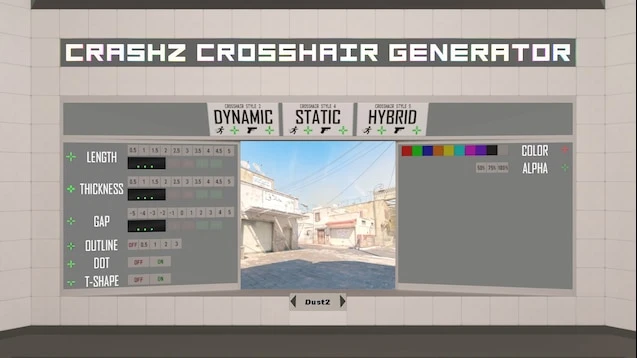
Crashz’ Crosshair Generator
This crosshair CS2 map is designed to allow you to change your crosshair on the fly and immediately see the results. Professionals use it like this:
- Quickly run 10-20 crosshair patterns.
- Visibility is checked on light and dark map backgrounds.
- They look at how the gap and thickness feel while static and while strafing.
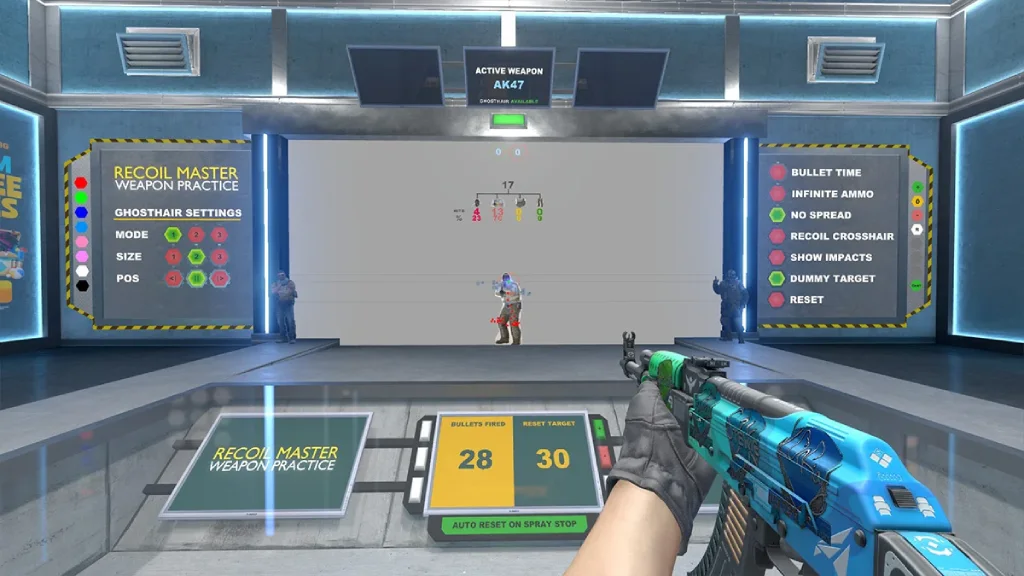
Recoil Master
Here, the center of the sight is tested under recoil. This isn’t a DM or shooting at bots – here you evaluate:
- How the gap behaves during a spray.
- How easy is it to track vertical recoil.
- Does the center of the sight “shake” due to thickness or color.
- Is the crosshair visible in smoky, light, and contrasting backgrounds.
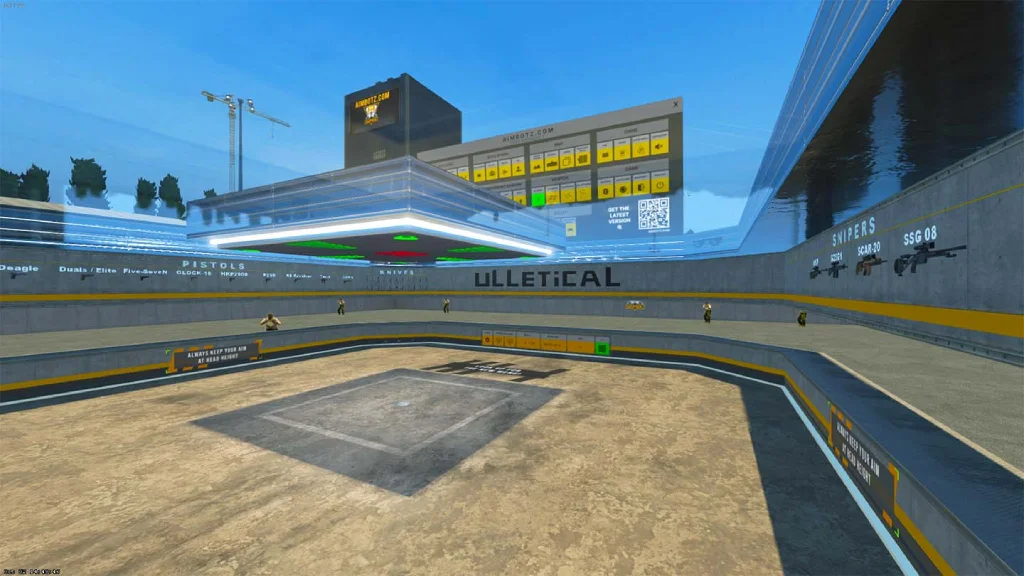
Aim Botz
Aim Botz is the only CS2 map where you can test crosshair in combat:
- Left/right flicks.
- Tweaking at different speeds.
- Head alignment while moving.
- Aim point performance at medium and long ranges.
- Color stability in different lighting conditions.
Choosing the Right Crosshair for Your Playstyle
In addition to being comfortable, a crosshair should also be compatible with your role. This is important because each role requires different center density, gap, thickness, and brightness.
What’s ideal for AWPers will hinder an entry fragger, while a versatile “rifler” crosshair will break for a player who works in the shadows or in prolonged skirmishes. We’ve prepared descriptions of CS2 crosshairs for each role. We hope this will help you choose the best CS2 crosshair for your playstyle.
Riflers
Riflers need a crosshair that doesn’t obscure the head hitbox and also allows you to maintain eye level. The following characteristics should be present in a CS2 crosshair:
- Thin lines to avoid obscuring the silhouette.
- Gap from -2 to -3 for a dense center.
- Moderate size (1.5-2.5).
- Bright color for dynamic control.
- No contours or minimal outline.
AWPers
An AWPer needs a reticle that doesn’t interfere with sniper aiming. It should also remain visible during quickscope/unscope micromovements. Based on this, the specifications are as follows:
- Dot or ultra-short beams.
- Size 0.5-1.0.
- Gap = -2 or -3.
- Minimum thickness.
- Color with maximum visibility in the center of the screen.
Entries
An entry fragger opens corners and accepts duels where a model emerges from around a corner for 20-100 ms. The reticle should be immediately visible, even if the camera shifts sharply. Ideal parameters for entry:
- More noticeable thickness (0.8-1.5).
- Bright color: cyan, yellow, bright green.
- Gap -1 or -2 (a more open center speeds up model acquisition).
- Medium size for balancing chaos in close combat.
Lurkers
Accuracy is paramount for a lurker. They need a reticle that doesn’t interfere with micro-pixel targeting:
- Very thin lines (0.3-0.6).
- Small size – 1.0-2.0.
- Gap -2.5 or -3.
- Soft but contrasting colors.
- Absence of unnecessary visual elements.
Supports
Supports handle grenades, position changes, retakes, and chaotic duels. The reticle must be reliable in all conditions, so the best parameters for a support are:
- Slightly thicker lines for readability.
- Bright or contrasting colors (yellow/blue/white).
- Size 2-3.
- Outline = 1 to maintain visibility.
Most Common Crosshair Mistakes
Customizing your CS2 crosshair will often have a positive impact on your abilities. However, this is only relevant if you do not make mistakes. They are very subtle and difficult to spot on your own. Therefore, we’ve prepared a list of the most common mistakes players make when configuring their CS2 crosshair settings:
- Color blending with maps: When the crosshair color matches the map texture, the brain loses its visual anchor. Yellow crosshairs disappear on Mirage and Anubis, green crosshairs on Ancient, and blue crosshairs on Overpass. We recommend using Cyan; it doesn’t disappear on any map.
- Too-large crosshairs: Large crosshairs obscure the hitbox, disrupting model perception and disrupting first-bullet control. We recommend setting the size between 1.5–2.5 and keeping the gap between -2 and -3 to keep the center tight.
- Constantly changing crosshair: The most damaging mistake. Frequent crosshair changes disrupt motor memory. The brain thinks more about the center geometry than about mouse movement. Choose one crosshair and leave it alone for at least 7-10 days, otherwise you won’t progress.
- Over-customization: Crosshairs with dots, lines, contours, dynamics, and other non-standard shapes create visual noise. The recommendation is very simple: leave only size + gap + thickness..
- No outlines where needed: The lack of outline on light maps causes the crosshair to “disappear” in bright surfaces. This is especially noticeable during movement, when the player uses peripheral vision. It’s better to set outline to 1 on maps with bright walls (Dust2, Vertigo, Anubis). For other maps, keep it at 0.
Final Recommendations
In conclusion, we can’t help but remind you that your accuracy in CS2 depends entirely on your crosshair. It’s a central element of the visual-motor system and must be predictable, high-contrast, and, of course, suit your shooting style.
Experimenting with colors, sizes, and so on is certainly a good idea. However, remember that it’s recommended to play with one crosshair for at least two weeks. This is the period during which the brain can develop a stable motor pattern. So don’t forget this, and, of course, practice. We wish you the best crosshair in CS2 that suits you and win even more often!
FAQ
The easiest way to reset your crosshair CS2 is through the settings. To do this, open Settings → Game → Crosshair and click the reset button (Default). After doing this, the game will return to the default dynamic crosshair with all factory settings.
The best crosshair for headshots is a compact, static crosshair with thin lines and a tight center. The gap should be between -2 and -3. This crosshair won’t block your head and will provide a clear fixation point at eye level.
The CS2 dot crosshair is only suitable for experienced players with a well-developed aiming system. It provides a perfect center without unnecessary elements and the clearest possible picture around your opponent’s head. However, if you frequently undershoot or misalign your head, the dot CS2 crosshair is clearly not for you. For most players, it’s more reliable to use a hybrid crosshair (a small crosshair with a neat gap) rather than a pure dot.
Partially yes. Resolution and aspect ratio affect the visual perception of crosshair size. On a 4:3 stretched screen, the crosshair appears wider because the image is stretched horizontally, while on a 16:9 screen, it appears more compact. Therefore, if you change resolutions, the crosshair CS2 also needs to be fine-tuned to the new visual scale.
Bright, cool shades are considered best. Cyan and its close turquoise variations are considered the best crosshair color CS2. Yellow and green shades are also considered good, but they have problematic areas on some maps (Mirage, Ancient). In general, the main rule is that the color should contrast with most background surfaces and not blend in with the dominant colors of the map.
Read also: